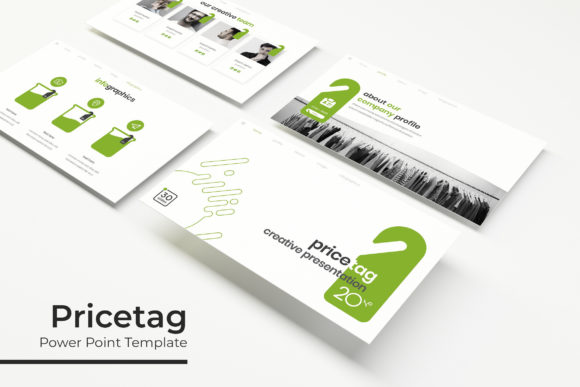
Pricetag Power Point Template: A Versatile Design Tool
When it comes to creating impactful and visually appealing presentations, the Pricetag Power Point Template stands out as a robust and versatile solution. This template is designed to help professionals, educators, and creatives deliver their messages with clarity and style, making it an invaluable tool for a wide range of applications.
Key Features and Strengths
The Pricetag Power Point Template offers a comprehensive set of features that cater to both form and function. Here’s what makes it a standout choice:
- 150 Total Slides: With 30 slides for each of the 5 premade color variations, you have ample space to present your content in a structured and engaging manner.
- Handcrafted Infographics: Each infographic is meticulously crafted to enhance visual storytelling, making complex data easy to understand.
- Section Break Slides: These slides help in organizing your presentation into clear, logical sections, improving the flow and readability.
- Gallery and Portfolio Slides: Perfect for showcasing your work or products, these slides are designed to highlight visuals in a professional and attractive way.
- Resizable and Editable Graphics: All graphic elements, including picture placeholders, are fully editable, allowing you to customize them to fit your specific needs.
- Based on Master Slides: The use of master slides ensures consistency across your presentation, saving you time and effort in formatting.
- Pixel-Perfect Illustrations: High-quality illustrations add a polished and professional touch to your presentation.
What’s Included in the Package
The Pricetag Power Point Template comes with everything you need to create a stunning presentation:
- 5 PPTX Files: Standard format for compatibility with most versions of PowerPoint.
- 5 PPTX Widescreen Files: Ideal for modern widescreen displays, enhancing the visual impact of your presentation.
- 5 Premade Color Variations: Choose from a variety of color schemes to match your brand or personal preference.
- Readme First Document: A detailed guide to help you get started and make the most of the template.
- Free Font Download Link: Access to the fonts used in the template, ensuring your text looks just as intended.
Practical Applications Across Various Fields
The Pricetag Power Point Template is not just a one-size-fits-all solution; it’s designed to be flexible and adaptable to different needs:
For Professionals and Entrepreneurs
Business owners and entrepreneurs can use this template to create compelling pitches, business plans, and marketing strategies. The clean, professional design helps in presenting ideas clearly and professionally, making a strong impression on clients and investors.
For Educators and Trainers
Educators can leverage the template to create engaging and informative lectures, training materials, and course overviews. The handcrafted infographics and section break slides make it easier to explain complex concepts and keep students engaged.
For Creatives and Designers
Creatives and designers can use the portfolio and gallery slides to showcase their work in a visually appealing way. The ability to resize and edit graphics allows for a high degree of customization, ensuring that each presentation is unique and tailored to the individual's style.
Benefits of Using the Pricetag Power Point Template
By using the Pricetag Power Point Template, you can enjoy several key benefits:
- Enhanced Visual Appeal: The high-quality illustrations and well-designed layouts make your presentations look professional and polished.
- Improved Clarity and Communication: The organized structure and clear section breaks help in delivering your message more effectively.
- Time-Saving Customization: With pre-designed master slides and editable graphics, you can quickly tailor the template to your specific needs without starting from scratch.
- Consistent Branding: The 5 premade color variations allow you to choose a color scheme that aligns with your brand, maintaining a consistent and professional look throughout your presentation.
- Increased Engagement: The use of handcrafted infographics and visually appealing designs keeps your audience engaged and interested in your content.
Practical Considerations and Recommendations
When selecting and using the Pricetag Power Point Template, consider the following tips to maximize its effectiveness:
- Choose the Right Color Scheme: Select a color variation that complements your brand or the theme of your presentation. Consistency in color can significantly enhance the overall look and feel.
- Customize Thoughtfully: While the template is highly customizable, it’s important to maintain a balance between personalization and the original design. Avoid over-cluttering the slides to keep the presentation clean and focused.
- Use High-Quality Images: The placeholder images in the template are meant to be replaced with your own. Ensure that the images you use are high quality and relevant to your content.
- Practice Your Presentation: No matter how good the template is, the delivery of your presentation is crucial. Practice your speech and familiarize yourself with the flow of the slides to ensure a smooth and effective presentation.
In conclusion, the Pricetag Power Point Template is a powerful and versatile tool that can elevate your presentations to the next level. Whether you’re a professional, educator, or creative, this template offers the flexibility and design quality needed to make a lasting impression. Give it a try and see the difference it can make in your next presentation.