Evaluating the Squidbod Google Slide Template for Professional Presentations
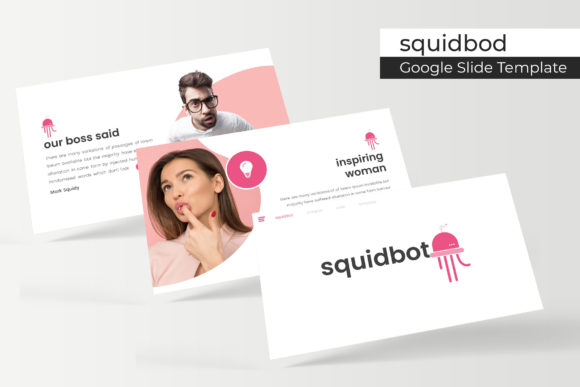
Selecting the right presentation framework is a critical step in effective visual communication. For professionals, educators, and marketers, the Squidbod Google Slide Template represents a comprehensive design system rather than a simple collection of backgrounds. When evaluating this asset, it is essential to look beyond surface-level aesthetics and understand the structural utility it provides. This template offers a substantial library of 150 total slides organized across five distinct premade color themes. Understanding the specific capabilities and limitations of Squidbod allows potential users to determine if it aligns with their workflow requirements and project goals.
Structural Capacity and Design Consistency
The primary value proposition of the Squidbod Google Slide Template lies in its volume and organizational structure. With 150 total slides divided into five color variations, users effectively gain access to five separate 30-slide decks. This segmentation is significant for decision-making because it offers variety without sacrificing coherence. Each color theme maintains consistent typography, spacing, and layout logic, ensuring that switching between themes does not require manual realignment of elements.
For users managing multiple projects or brand identities, this structure reduces cognitive load. Instead of searching through a single massive file containing 150 mixed layouts, the separation into five distinct files allows for targeted selection. This organization supports faster iteration cycles during the drafting phase. However, evaluators should consider whether they require this level of volume. For short, singular presentations, a 150-slide library may introduce unnecessary complexity. The template is best suited for users who anticipate creating multiple decks over time or who need extensive layout options for data-heavy reports.
Technical Customization and Master Slide Architecture
A critical factor in assessing any premium slide template is the underlying technical architecture. Squidbod is built upon Master Slides, which distinguishes it from lower-quality alternatives that rely on grouped objects on individual pages. This master-slide foundation ensures that global changes—such as updating a logo, changing a font family, or adjusting footer text—propagate instantly across all relevant slides. This feature is vital for maintaining brand compliance and reducing repetitive formatting tasks.
The template includes resizable and editable graphics alongside picture placeholders designed for drag-and-drop functionality. From an evaluation standpoint, this indicates a balance between artistic control and ease of use. Users do not need advanced illustration skills to modify visuals, yet the vector-based nature of the graphics prevents pixelation when resizing. The inclusion of pixel-perfect illustrations suggests attention to detail in the asset creation process, which contributes to a polished final output. Prospective users should verify that their team possesses basic proficiency in editing master slides; while the drag-and-drop features are accessible, maximizing the template's efficiency requires understanding how parent and child slide relationships function within Google Slides.
Content Versatility: Infographics, Portfolios, and Section Breaks
Beyond standard text-and-image layouts, Squidbod provides specialized slide types that address specific communication challenges. The inclusion of handcrafted infographics is particularly relevant for users who must translate complex data into digestible visuals. Unlike generic chart templates, handcrafted infographics often offer unique metaphors and flows that can differentiate a presentation from standard corporate outputs. Evaluators should review the infographic styles to ensure they match the tone of their industry; highly stylized graphics may not suit conservative sectors like finance or law, whereas creative or tech industries may find them ideal.
The template also features dedicated gallery and portfolio slides, as well as section break slides. These components serve functional navigation purposes, helping audiences track progress through long presentations. For agencies, freelancers, or job seekers, the portfolio layouts provide immediate utility for showcasing work. However, users focused exclusively on internal reporting or academic lectures may find these specific slides less applicable. Assessing the ratio of utilitarian slides versus showcase slides helps determine if the content mix matches the user’s primary use case.
File Deliverables and Licensing Considerations
When acquiring digital assets, clarity regarding deliverables is non-negotiable. The Squidbod package includes five PPTX files and five widescreen PPTX variants, along with a readme file and links to free fonts. It is important to note that despite the product name referencing Google Slides, the deliverables listed are in PPTX format. Users intending to use this natively in Google Workspace will likely need to upload these PPTX files to Google Drive and convert them. While conversion is generally seamless, minor formatting shifts can occur. Decision-makers committed strictly to cloud-native workflows should test the conversion process before committing to ensure compatibility.
Furthermore, the licensing terms specify that photographs used in previews are for illustration purposes only and are not included. This is a standard industry practice, but it impacts project timelines. Users must budget time and resources for sourcing their own imagery. Relying on placeholder images during the evaluation phase is acceptable, but production planning must account for asset acquisition. The inclusion of free font download links mitigates one common friction point, ensuring that typography renders correctly without additional licensing costs.
Situational Fit and Alternative Options
Determining whether Squidbod is the correct choice depends heavily on the user's specific context. This template is a strong fit for consultants, marketing teams, and educators who require a versatile, high-volume asset library that can adapt to various topics and brands. The combination of master-slide editability and diverse layout types supports high-frequency presentation creators who value consistency and speed over bespoke, from-scratch design.
Conversely, alternatives may be worth considering in specific scenarios. If a user requires strict adherence to a pre-existing corporate brand guideline that differs significantly from Squidbod’s five premade colors, the time spent re-theming the master slides might equal the time required to build a custom deck. In such cases, a blank branded master or a different template closer to the target aesthetic may be more efficient. Additionally, users needing native Google Slides animations or interactive elements should verify that the PPTX-to-Google-Slides conversion preserves these features, as some advanced transitions do not translate perfectly between platforms.
Making an Informed Selection
Ultimately, the Squidbod Google Slide Template should be evaluated as a productivity tool rather than merely a decorative overlay. Its strength lies in the intersection of volume, structural integrity via master slides, and versatile content types like infographics and portfolios. By weighing the benefits of its 150-slide ecosystem against the practical considerations of file format conversion and image licensing, users can make a grounded decision. Those who prioritize scalable design systems and are comfortable with PPTX workflows will likely find significant return on investment, while those seeking lightweight, native-cloud solutions for one-off presentations may need to explore other options.