Evaluating the Smartphone Interface Bundle for Modern App Design
In the competitive landscape of mobile application development and digital marketing, the speed at which a concept can be visualized often determines its success. The Smartphone Interface Bundle serves as a comprehensive resource for designers, developers, and marketers who need to prototype, present, or market mobile applications without starting from scratch. This collection of vector templates addresses a specific gap in the creative workflow: the need for high-quality, stylized UI assets that bridge the gap between wireframing and final presentation. Rather than offering generic device mockups, this bundle focuses on functional, cartoon-style interface screens tailored to specific app categories, making it a practical tool for professionals aged 20 to 50 who value efficiency alongside aesthetic consistency.
Core Components and Thematic Versatility
The primary strength of this Smartphone Interface Bundle lies in its thematic diversity. Unlike generalist UI kits that provide endless variations of login screens or settings menus, this collection targets distinct vertical markets. This specificity is crucial for professionals working on niche projects or client pitches where context matters more than generic layout structures.
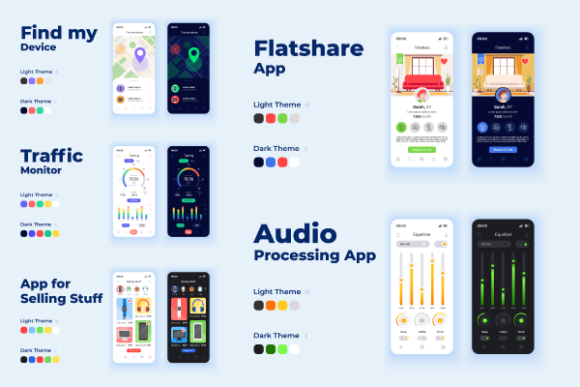
- Flatshare and Rental Applications: The bundle includes dedicated interfaces for finding rooms and managing shared living spaces. These templates go beyond basic listing views, incorporating map integrations, roommate profile cards, and amenity checklists that are standard in modern proptech solutions.
- E-Commerce and Selling Platforms: For apps focused on peer-to-peer selling or retail, the provided screens address product photography layouts, cart management, and secure checkout flows. The cartoon style here helps soften the transactional nature of commerce apps, making them appear more approachable during the concept phase.
- Utility and System Tools: Surprisingly robust utility templates are included, covering traffic monitoring and "Find My Device" functionalities. These screens demonstrate how to visualize data-heavy or location-based services in a user-friendly manner, solving the common design challenge of making technical tools look accessible.
- Audio Processing and Media: Audio apps require unique UI elements like waveforms, equalizers, and playback controls. The bundle provides specialized layouts for these features, ensuring that sound engineering or music streaming concepts can be presented with appropriate visual metaphors.
This targeted approach means that a freelancer pitching a rental app does not have to wade through hundreds of irrelevant gaming or fitness screens. The curation saves significant search time and ensures that the foundational UX patterns match the intended industry standards.
Aesthetic Consistency and Day/Night Mode Implementation
A critical consideration when selecting any UI asset pack is visual coherence. The Smartphone Interface Bundle utilizes a consistent cartoon vector style across all templates. This stylistic choice is strategic; it allows for rapid prototyping where the focus remains on user flow and feature set rather than pixel-perfect photorealism. For stakeholders and clients, cartoon interfaces often communicate "work in progress" or "concept" more effectively than polished high-fidelity designs, which can sometimes lead to premature feedback on colors or typography rather than functionality.
Furthermore, the inclusion of both day and dark mode designs for mobile app screen pages reflects current industry best practices. With operating systems now defaulting to system-wide theme switching, presenting only one mode is increasingly insufficient. This bundle acknowledges that reality by providing paired variations. This duality is particularly valuable for accessibility testing and for demonstrating to clients that the application has been considered for various lighting environments and user preferences. The transition between modes maintains color harmony and contrast ratios, reducing the workload for designers who would otherwise have to manually adapt a single light-mode template.
Technical Specifications and Workflow Integration
For professional use, file format flexibility is non-negotiable. This collection supports a wide ecosystem of design software through its inclusion of JPEG, AI, PNG, EPS, and SVG formats. Each format serves a distinct purpose in the production pipeline:
- AI and EPS: Essential for deep editing in Adobe Illustrator. These source files allow designers to modify colors, reshape vector elements, and extract individual components to build custom screens.
- SVG: Critical for web-based presentations and responsive prototyping tools like Figma or Sketch. SVGs ensure that the cartoon smartphone interface scales perfectly on any display without rasterization artifacts.
- PNG and JPEG: Useful for quick insertion into pitch decks, Word documents, or email updates where vector support is limited or unnecessary.
The presence of phone displays with flat characters adds another layer of utility. These aren't just empty frames; they are contextual scenes. When creating marketing brochures, social media ads, or app store preview graphics, having a character interacting with the device provides immediate scale and emotional connection. This eliminates the need to source separate stock illustrations and attempt to match their style to the UI templates.
Practical Value for Diverse Professional Roles
The applicability of the Smartphone Interface Bundle extends across several professional demographics. Understanding who benefits most helps in determining whether this investment aligns with specific workflow needs.
Freelancers and Agency Designers
For independent creatives, time is directly correlated to income. This bundle acts as a force multiplier, allowing for the delivery of high-volume concept work in a fraction of the time required for custom illustration. It is particularly useful during the discovery phase of a project when multiple directions need to be explored quickly. However, professionals should note that while these templates are excellent for ideation, they may require significant customization to meet strict brand guidelines for final production apps.
Entrepreneurs and Startup Founders
Non-designers entering the tech space often struggle to communicate their vision to investors or development teams. Using these pre-made, professional-grade templates allows founders to create credible pitch decks and user journey maps without hiring a full-time designer immediately. The specific categories, such as the flatshare or traffic monitor interfaces, align well with common startup verticals, making the visualization process more intuitive.
Educators and Content Creators
Those teaching UX/UI principles or creating tutorials benefit from the clean, illustrative nature of these assets. The cartoon style reduces cognitive load for students, focusing attention on layout hierarchy and interaction patterns rather than decorative details. Similarly, bloggers and publishers reviewing apps can use these templates to create consistent featured images or explanatory diagrams that stand out from standard screenshots.
Assessing Quality and Long-Term Usability
When evaluating digital assets, one must consider longevity. Trends in UI design shift rapidly, but the stylized, flat-cartoon aesthetic occupied by this Smartphone Interface Bundle tends to age more gracefully than hyper-realistic skeuomorphism or overly trendy glassmorphism. Its neutrality makes it a reliable staple in a resource library rather than a disposable trend piece.
Quality is also evident in the organization and completeness of the screens. A common pitfall with cheaper asset packs is the inclusion of "hero" screens only, neglecting secondary states like error messages, loading screens, or empty states. While this bundle focuses heavily on primary functional screens, users should verify that the included pages cover the necessary depth for their specific project. For comprehensive app mapping, this bundle may need to be supplemented with a more extensive wireframe kit, but for presentation and marketing purposes, it is remarkably self-contained.
Reliability in vector construction is another technical marker of quality. Well-constructed AI and SVG files use proper grouping, naming conventions, and scalable strokes. Based on the product description and typical outputs from established studios like BSD, users can generally expect organized layers that facilitate easy editing. This structural integrity is what separates professional resources from amateur freebies, ensuring that the time saved in setup isn't lost in fixing broken vectors.
Strategic Considerations Before Purchase
While the Smartphone Interface Bundle offers significant advantages, potential users should approach it with realistic expectations. It is a template collection, not a complete design system. It excels at accelerating the visual communication of ideas but does not replace the need for original UX research or custom branding. Professionals should view it as a scaffolding tool—a way to erect the structure of a presentation or prototype rapidly so that energy can be focused on refinement and strategy.
Additionally, licensing terms should always be reviewed. For commercial projects, especially those involving app store listings or large-scale advertising, ensuring that the license covers the intended usage is mandatory. The mention of BSD studio suggests a reputable source, but verifying the scope of rights for icons, brochure templates, and infographic elements included in the broader shop ecosystem is a necessary due diligence step.
Ultimately, this bundle represents a pragmatic solution for modern digital creators. By combining specific functional themes with versatile file formats and a cohesive visual style, it addresses the friction points of mobile app visualization. Whether used to secure funding, teach a class, or streamline a freelance workflow, it provides a solid foundation that balances aesthetic appeal with professional utility. For those frequently tasked with translating abstract app concepts into tangible visuals, keeping this type of curated resource in the toolkit is a sound strategic decision that pays dividends in saved hours and elevated presentation quality.