Designing with Precision: A Practical Guide to the Uscora Keynote Template
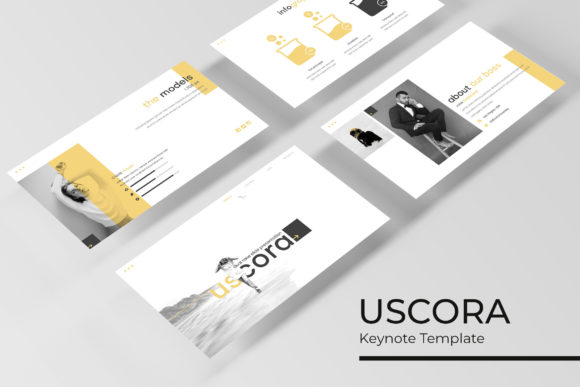
In the landscape of digital presentations, the difference between a mediocre slide deck and a compelling visual narrative often lies in the underlying architecture of the design. For professionals, educators, and creators who rely on Apple’s Keynote software, finding a resource that balances aesthetic flexibility with structural integrity is paramount. The Uscora Keynote Template serves as a comprehensive design system rather than a simple collection of layouts. By offering 150 total slides organized across five distinct premade color themes, this template addresses the specific needs of users who require high-volume content creation without sacrificing pixel-perfect quality. Understanding how to leverage such a robust tool requires looking beyond surface-level aesthetics and examining the functional mechanics that drive efficient presentation workflows.
The Strategic Value of Modular Slide Architecture
One of the primary challenges in presentation design is maintaining consistency across a large volume of content. When building a deck from scratch, designers often face the "blank canvas" paralysis or, conversely, the inconsistency that arises from manually adjusting individual slides. Uscora addresses this through its modular architecture, providing 30 unique slides for each of its five color variations. This structure is not arbitrary; it reflects a deep understanding of information hierarchy and pacing.
For business owners and researchers, this modularity translates into significant time savings. Instead of designing a new layout for every data point or concept, users can select from pre-engineered slides that are designed to work in concert. The 150-slide count ensures that niche requirements—such as specific chart types, team introductions, or comparative analyses—are likely already covered within the library. This reduces the cognitive load associated with design decisions, allowing the presenter to focus entirely on refining the message and narrative flow. The availability of five distinct color palettes further enhances this modularity, enabling organizations to align the template with specific brand guidelines or project moods without altering the fundamental layout structure.
Master Slides and Global Editability
The true power of any professional Keynote template lies in its use of Master Slides. In the context of Uscora, the master slide functionality acts as the central nervous system of the presentation. Rather than formatting text boxes and shapes individually, global changes made at the master level propagate instantly throughout the entire deck. This feature is critical for maintaining brand compliance and visual coherence.
When utilizing the Uscora Keynote Template, users should first establish their global preferences. Whether adjusting typography scales, updating logo placement, or shifting accent colors, doing so via the master slide ensures pixel-perfect alignment across all 150 slides. This approach prevents the common error of "slide drift," where manual adjustments over time lead to misaligned elements and inconsistent spacing. For agencies managing multiple client accounts or educators updating course materials semester after semester, this global editability transforms maintenance from a tedious chore into a streamlined process.
Visual Communication Through Handcrafted Infographics
Data visualization is often the breaking point for many presentations. Standard charting tools can produce accurate graphs, but they frequently lack the contextual design elements necessary to make complex data digestible. Uscora distinguishes itself by including handcrafted infographic sections that go beyond automated generation. These are not merely static images; they are fully editable vector graphics constructed directly within Keynote.
This distinction is vital for researchers and analysts who need to present dynamic data. Because these infographics are native to the file format, every element—from bar heights to icon placements—can be modified to reflect current statistics. The handcrafted nature of these illustrations ensures that they possess a bespoke quality often missing from generic stock assets. They serve as visual anchors that break up dense textual content, guiding the audience’s eye and reinforcing key takeaways. Furthermore, because they are built on master slides, updating the color scheme of an infographic to match a new theme takes seconds rather than hours of recoloring individual vector points.
Section Breaks and Narrative Pacing
Effective presentations are structured like stories, requiring clear transitions to help the audience mentally organize information. The gallery and portfolio slides included in Uscora function as essential pacing mechanisms. These section break slides are designed to provide visual breathing room, signaling a shift in topic or tone. In educational settings, these breaks might separate different modules of a lecture. In corporate environments, they can delineate quarterly results from strategic forecasting.
The inclusion of dedicated portfolio and gallery layouts also speaks to the versatility of the template. Creatives and freelancers can utilize these slides to showcase work samples with consistent framing and captioning, while businesses can use them to display product lines or case studies. The resizable and editable graphic placeholders ensure that regardless of the aspect ratio of the source imagery, the slide maintains its structural integrity. This adaptability is crucial when integrating user-generated content or third-party assets that may not originally match the presentation’s dimensions.
Technical Implementation and Asset Management
Adopting a comprehensive template like Uscora requires an understanding of its technical deliverables and best practices for asset management. The package includes five KEY files optimized for widescreen displays, ensuring compatibility with modern projection standards and digital viewing environments. Widescreen optimization is no longer optional; it is the baseline expectation for professional communication, and having dedicated files prevents the distortion or cropping issues associated with resizing legacy standard-definition templates.
A critical consideration for new users is the handling of typography and imagery. The template includes a Readme First file that provides direct download links for the free fonts used in the design. Installing these fonts before opening the files is mandatory to preserve the intended layout and spacing. Missing fonts are the most common cause of broken templates, leading to text reflow and alignment errors that undermine the pixel-perfect promise of the design system.
Understanding Licensing and Placeholder Logic
It is imperative for users to understand the distinction between the template assets and the preview imagery. All photographs and pictures used in the promotional previews are for illustration purposes only and are not included in the download. This is a standard industry practice that protects intellectual property rights and keeps the file size manageable. Users must supply their own imagery to populate the resizable picture placeholders.
These placeholders utilize Keynote’s native masking and drag-and-drop functionality. This means replacing an image does not require external editing software; users simply drag their photo onto the placeholder, and the mask automatically crops it to fit the designated area. This workflow encourages experimentation, as swapping visuals becomes a low-friction task. However, users should be mindful of image resolution. While the placeholders are flexible, using low-resolution source images will result in pixelation when projected on large screens. Sourcing high-quality, royalty-free photography or original assets is necessary to maintain the professional standard established by the template’s vector elements.
Optimizing Workflow for Diverse User Groups
The breadth of the Uscora Keynote Template makes it applicable to a wide spectrum of users, each with distinct workflow requirements. For educators and academic researchers, the 150-slide library offers a repository of citation layouts, definition cards, and process diagrams that can be reused across multiple courses or papers. The ability to switch between five color variations allows for visual differentiation between subjects or semesters without requiring a redesign of the core content structure.
For marketing professionals and business owners, the template serves as a brand governance tool. By locking down the master slides and establishing approved color variations, teams can ensure that decentralized content creation still adheres to central brand standards. The handcrafted infographics allow for rapid reporting, while the portfolio slides support sales enablement and partnership pitches. Hobbyists and creators benefit from the same professional-grade tools, gaining access to design systems that would typically require hiring a specialist. The learning curve is mitigated by the intuitive drag-and-drop mechanics and the comprehensive documentation provided in the Readme file.
Long-Term Maintenance and Scalability
Sustainable presentation design is about creating assets that endure. Uscora supports long-term scalability through its clean layer organization and semantic naming conventions within the master slides. When a template is well-organized, it remains usable years after its initial release. Users can archive completed projects and duplicate the master KEY file for new initiatives, confident that the foundational design elements remain intact.
Furthermore, the reliance on free, downloadable fonts ensures that the template remains accessible even if specific typefaces become deprecated or change licensing terms. Unlike templates that rely on paid font subscriptions or obscure type libraries, Uscora’s typographic choices prioritize longevity and accessibility. This forward-thinking approach to asset selection reinforces the template’s value proposition as a durable design infrastructure rather than a disposable aesthetic skin. By treating the template as a living system that evolves with the user’s needs, professionals can maximize their return on investment and maintain a consistently high standard of visual communication across all their endeavors.