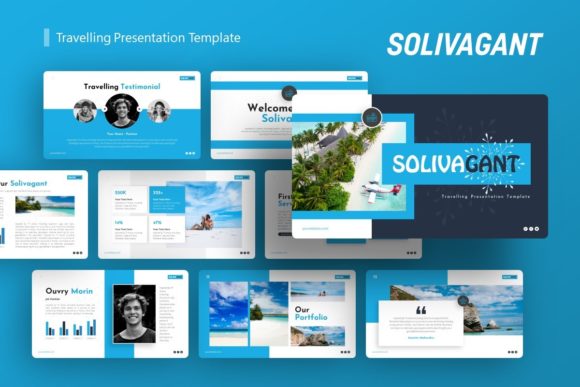
Introducing Solivagant: A Versatile Presentation Template for Modern Storytelling
In the fast-paced world of digital communication, the ability to convey ideas clearly and aesthetically is more valuable than ever. Whether you are pitching a startup to venture capitalists, showcasing a photography portfolio, or presenting a quarterly corporate report, the visual vehicle you choose matters as much as the content itself. Enter Solivagant, a comprehensive presentation template designed to bridge the gap between creative expression and professional structure. This article explores the significance of high-quality presentation design, breaks down the specific features of the Solivagant Travelling Presentation template, and offers practical guidance on how to leverage such tools to elevate your personal or business narrative.
Understanding the Role of Professional Templates in Communication
Before diving into the specifics of Solivagant, it is essential to understand why presentation templates have become a staple in modern business and creative workflows. A common misconception is that using a template stifles creativity or results in generic output. In reality, a well-crafted template like Solivagant serves as a sophisticated foundation. It handles the complex grid systems, typography hierarchies, and color theory, allowing the presenter to focus entirely on storytelling and data accuracy.
In an era where attention spans are short, visual coherence builds trust. When slides are misaligned, fonts clash, or infographics look amateurish, the audience subconsciously questions the credibility of the information being presented. Professional templates ensure pixel-perfect consistency across dozens of slides, maintaining viewer engagement from the introduction to the closing call-to-action. This is particularly relevant for freelancers, agencies, and startups that may not have a dedicated in-house graphic designer but still require agency-level polish.
What is the Solivagant Presentation Template?
Solivagant is a multi-purpose presentation template that distinguishes itself through versatility and depth. The name itself suggests a journey, fitting for a tool designed to guide audiences through complex narratives. While many templates are niche-specific—designed solely for medical reports or tech startups—Solivagant is engineered for adaptability. It functions effectively across a wide spectrum of use cases, including:
- Creative Agencies and Portfolios: For displaying visual work with minimal distraction.
- Corporate and Business Profiles: For structured reporting and company overviews.
- Startups and Pitch Decks: For persuasive storytelling aimed at investors.
- Photography and Art: For image-heavy layouts that respect negative space.
- Personal Branding: For resumes, media kits, and personal introductions.
This breadth of application makes Solivagant a "Swiss Army Knife" for presenters. Instead of purchasing separate templates for different projects, users can rely on a single, cohesive system that adapts to various contexts without losing its professional identity.
Core Features That Define Usability
The true value of a presentation asset lies in its technical execution. Solivagant includes several features that cater to both beginners and experienced designers. Understanding these features helps users maximize the template's potential.
36 Unique Slides and Master Slide Architecture
Quantity often correlates with flexibility, and Solivagant provides 36 distinct slide layouts. However, the underlying architecture is what truly matters. The template is based on Master Slides. For those unfamiliar with PowerPoint mechanics, Master Slides act as global style controllers. Changing a font or logo placement on the Master Slide automatically updates every corresponding slide in the deck. This feature saves hours of manual formatting and ensures that last-minute branding changes can be implemented instantly across the entire presentation.
Handcrafted Infographics and Pixel-Perfect Illustrations
Data visualization is a critical component of modern presentations. Solivagant moves beyond standard chart tools by offering handcrafted infographics within PowerPoint. These are not static images; they are fully editable vector elements. Users can adjust percentages, change colors to match brand guidelines, and resize graphics without experiencing pixelation. This level of editability is crucial for maintaining visual sharpness on large projection screens or high-resolution displays.
Drag-and-Drop Picture Placeholders
One of the most significant friction points in presentation design is image management. Solivagant utilizes intelligent picture placeholders. Rather than cropping and resizing images manually in external software, users can simply drag and drop their photos directly into the designated areas. The template automatically masks and fits the image to the layout’s proportions. This streamlines the workflow significantly, making it accessible for users who lack advanced photo editing skills.
Practical Applications Across Industries
To fully grasp the utility of Solivagant, it is helpful to examine how it applies to real-world scenarios. The template’s design philosophy supports diverse narrative structures.
For Startups and Pitch Decks
A pitch deck requires a delicate balance of emotion and logic. Investors need to see market size, traction, and team bios quickly. Solivagant’s infographic slides allow founders to visualize growth metrics clearly, while the clean typography ensures that value propositions are readable. The template’s professional aesthetic signals maturity and preparedness, which are intangible assets during fundraising.
For Creative Professionals and Photographers
Creatives often struggle with PowerPoint because standard layouts feel too rigid. Solivagant addresses this with ample whitespace and gallery-style layouts. The emphasis here is on letting the user's work breathe. Because all graphics are resizable and editable, a photographer can create a custom portfolio that feels bespoke rather than templated, showcasing their unique artistic voice within a structured framework.
For Corporate Training and Education
Educators and corporate trainers need to break down dense information. The handcrafted infographics serve as cognitive aids, helping learners retain complex processes or statistics. Furthermore, the documentation file included with Solivagant assists educators in understanding how to manipulate the slides, ensuring they can update training materials year after year without starting from scratch.
Navigating Files and Technical Considerations
When adopting a new digital asset, understanding the deliverables is vital for a smooth experience. Solivagant comes with a specific set of files designed to support the user journey.
- PowerPoint .PPTX File: The core asset compatible with Microsoft PowerPoint. This is the working file where all customization occurs.
- Documentation File: A guide that explains how to edit masters, replace images, and utilize icons. Beginners should read this first to avoid common pitfalls.
- Vector Icons: A supplementary library of scalable icons that integrate seamlessly with the slide designs, reducing the need to source third-party graphics.
Important Note on Imagery: Users must understand that the images seen in the demo preview are for illustrative purposes only and are not included in the downloadable files. This is standard industry practice due to licensing restrictions. Presenters should prepare their own high-quality assets or utilize royalty-free stock photo services to populate the placeholders. Recognizing this distinction upfront prevents confusion and ensures you have your visual assets ready before beginning the design process.
Best Practices for Customizing Solivagant
While Solivagant is easy to customize, achieving a professional result requires intentionality. Here are educational tips for getting the most out of this template:
- Maintain Visual Hierarchy: Just because you can resize text doesn't mean you should fill every inch of space. Respect the original whitespace designed into the template to keep slides uncluttered.
- Consistency is Key: Stick to the pre-defined color palette or update it globally via the Master Slide. Avoid picking random colors for individual slides, as this breaks visual continuity.
- Leverage the Infographics: Do not replace handcrafted infographics with screenshots of Excel charts. Use the native vector tools provided to keep the presentation crisp and professional.
- Test on Target Hardware: Always preview your presentation on the actual screen or projector you will be using. Colors and contrast can vary between devices, and testing ensures your pixel-perfect illustrations remain effective in the real world.
Conclusion: Elevating Your Narrative
The Solivagant Travelling Presentation template represents more than just a collection of slides; it is a toolkit for effective communication. By combining technical robustness with aesthetic flexibility, it empowers users across industries to tell better stories. Whether you are building a company profile, launching a startup, or curating a personal portfolio, the right template removes technical barriers and lets your ideas shine. In a landscape where visual literacy is paramount, investing time in mastering tools like Solivagant is an investment in your professional clarity and impact. With its 36 customizable slides, master slide integration, and comprehensive documentation, Solivagant stands ready to support your next great presentation.